
Home›Transport
Transport managementEvery route, every seat, every bus fee under control.
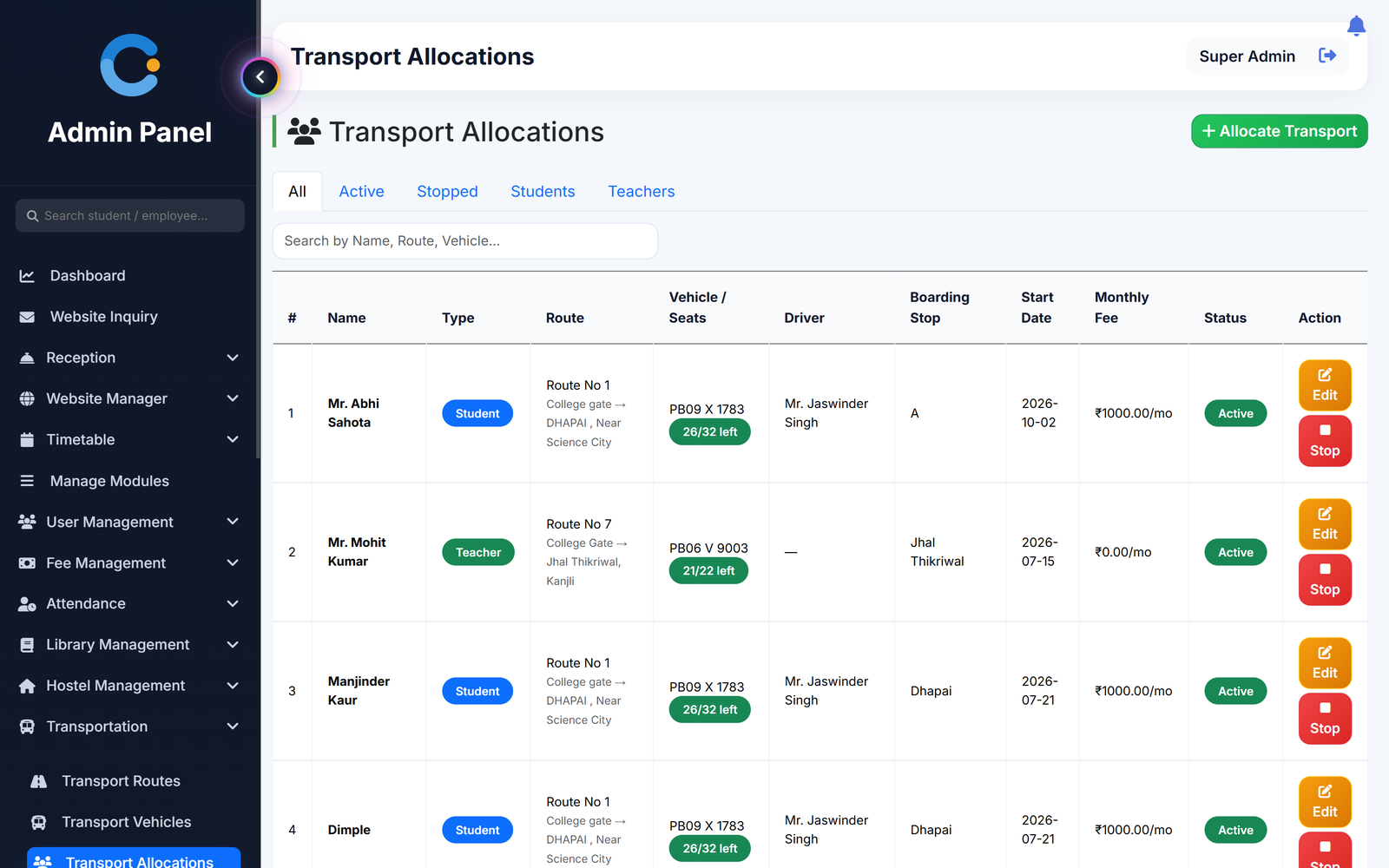
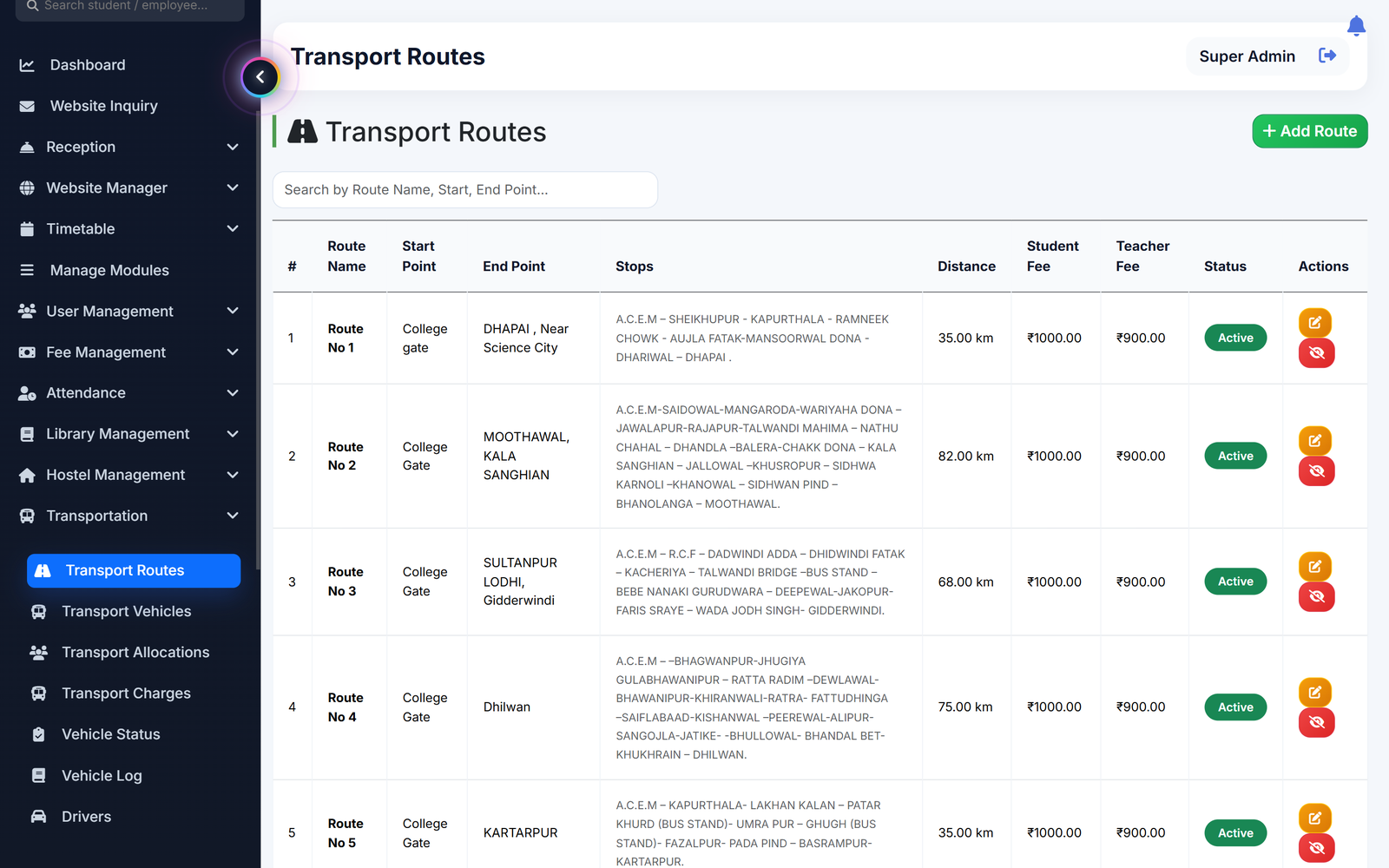
Add routes with their fee, add buses with driver and seats, then allot a student or teacher to a route and boarding stop. The monthly transport fee starts from that date as a separate charge, and a papers tracker warns you before insurance, fitness or permit runs out.
Where transport records usually break
Buses filled beyond their seats
Every vehicle has a capacity. While allotting, the list shows seats left and a bus with no seat left cannot be picked.
Bus fee chased by hand each month
The first charge is made when the student is allotted. Later months are added on the same date each month, and the student gets a notification.
Bus fee mixed up with tuition
Transport is billed as its own charge. A student can be clear on tuition and pending on the bus, and the office sees both without confusion.
Insurance or fitness expiring unnoticed
Keep licence, registration, insurance, pollution, fitness, permit and tax dates for each vehicle in one place, with safety items marked OK or expired.
How transport runs from route to receipt
Set up once, then it follows the student.
- Add routes and vehicles. Create each route with stops, distance and fee, then add vehicles with driver, capacity and the route they run.
- Allot a student or teacher. Pick the person, route, vehicle and boarding stop, and set the start date. Teachers can have their own fee or be exempt.
- Fee is raised automatically. The first monthly charge is created at allotment. Later months are added on the same date each month.
- Record payment, print receipt. Record what was paid. The charge turns partial or paid, and a numbered receipt can be printed.
What is included
Who sees what
Transport in-charge
Logs in with a transport role to manage routes, vehicles, allotments, charges, payments and notices.
Admin / principal
Has the same transport screens, and sees transport dues along with tuition and hostel.
Reception and accounts
Search a student to see fees, transport and hostel dues together, and download the transport dues report.
Student and teacher
See their route, boarding stop, vehicle, driver and pending transport charges after logging in.
Asked about transport
Can teachers and staff use the bus too?
Teachers can be allotted to a route with their own fee, or marked exempt so no fee is raised.
How is the transport fee charged?
The fee set on the route is charged from the start date, then again on the same date every month. If a student stops using the bus, stop the allotment.
Does it stop us from overfilling a bus?
The allotment list shows seats left for each vehicle and a vehicle with no seat left cannot be selected.
Can parents or students pay the bus fee online?
No online gateway is connected. The office records the payment as cash, online, cheque or demand draft, and a receipt is generated.
Does it track the bus live on a map?
No. There is no GPS tracking. Transport covers routes, vehicles, allotment, fees and bus papers.
Modules that share the same records
Hostel
Hostel buildings, rooms and bed allotment, with monthly hostel fees billed and receipted separately.
Fee management
Fee structure, invoices, receipts, scholarships and a live dues list.
Mobile app
One Android app for teachers and students: attendance, timetable, results, assignments and more on the phone.
See transport running with your institution's name on it.
- A real walkthrough, not a slide deck. We set your institution up while you watch.
- Bring your hardest question. Fees and exam patterns are where most systems fall over.
- No obligation. If it is not right for you, we will say so.
Book a free demo
Tell us about your institution and we will show you exactly how it would run.