
Home›Attendance
Attendance managementAttendance marked in the period, reported in a click.
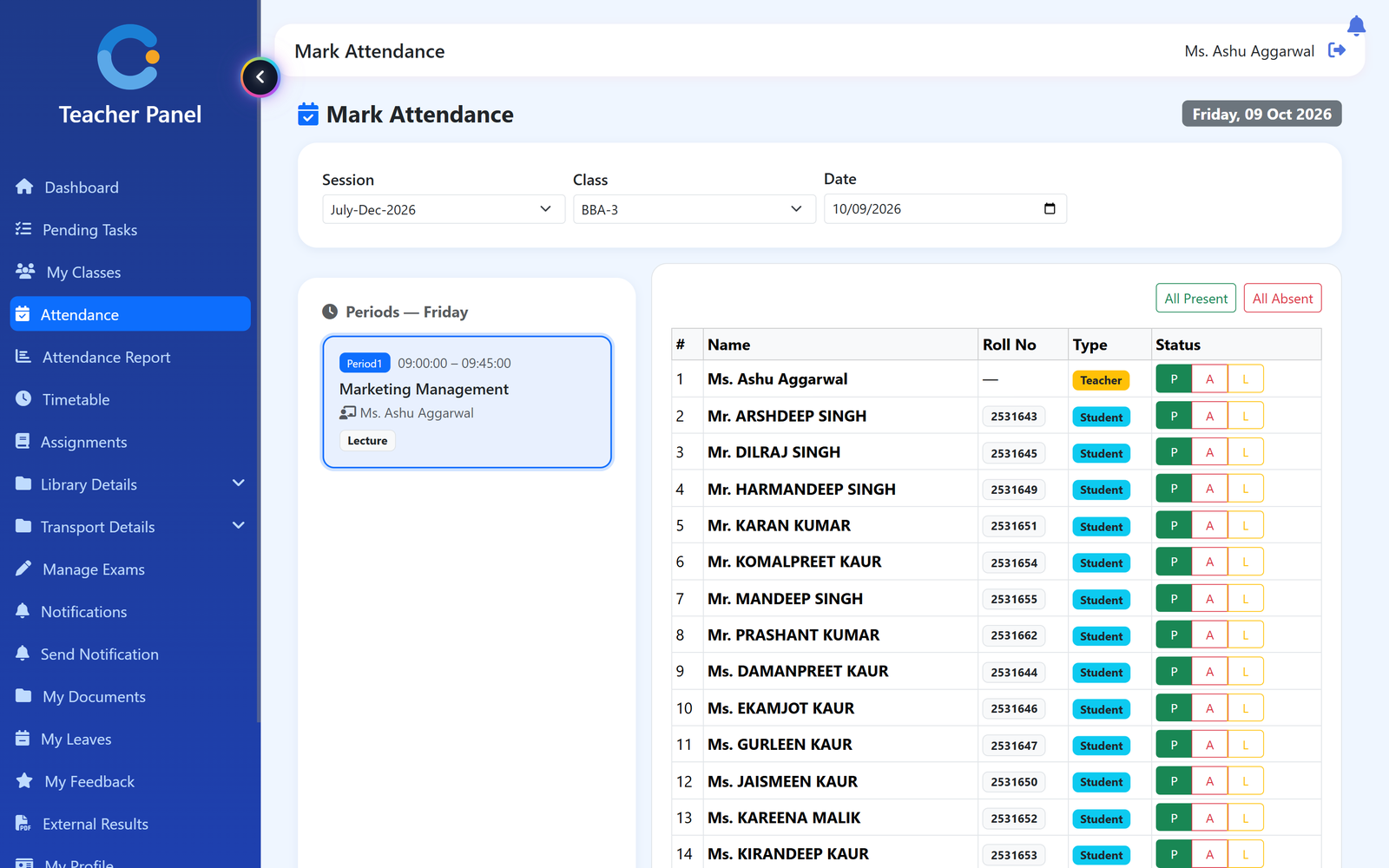
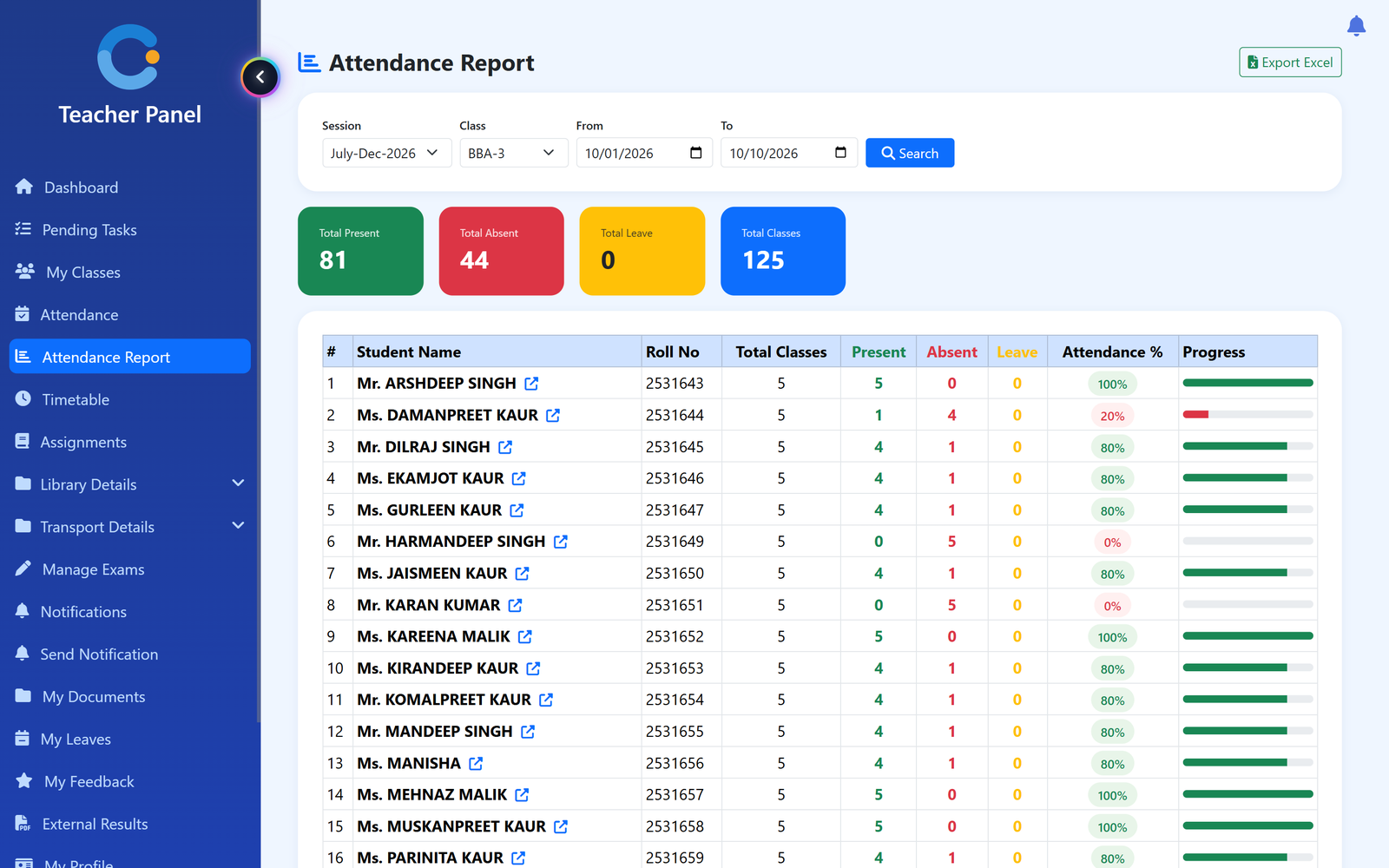
The teacher opens the period from the timetable and marks each student present, absent or on leave. Once saved it is locked, and the class report shows every student's percentage for any date range — no registers to add up at month end.
Where attendance usually breaks
Paper registers and month-end totals
Counting present days from a register takes hours and is easy to get wrong. Here the percentage is worked out for you for any date range.
Attendance edited after the fact
Once a period is saved it is locked. A teacher cannot change it afterwards; only the admin can unlock it, and the system keeps a list of what is locked.
No view of one student's record
Open any student from the class report to see their attendance in detail, and export that record to Excel when a parent or the principal asks.
Parents learn about shortage too late
Students see their own attendance, and parents see their child's in the parent portal, so the picture is not a surprise at exam time.
How attendance moves through the system
Marked once by the teacher, reported to everyone who needs it.
- Timetable sets the periods. The teacher's periods for the day come from the timetable, for the class and session chosen.
- Teacher marks the period. Present, absent or leave for each student, or All Present / All Absent and change the exceptions.
- Save and lock. The period is saved and locked. Teachers can mark up to 7 days back; older dates need the admin.
- Read the report. Pick the class and dates to see total present, absent and leave, and each student's percentage.
What is included
Who sees what
Teacher
Marks attendance for their own periods, on the web or in the Android app, and sees reports for their classes.
Head of department
Sees the attendance report for the classes in their own department.
Admin / principal
Sees every class, and is the one who can unlock a saved period.
Student
Sees their own attendance in the student Android app or any browser.
Parent
Sees their child's attendance in the parent portal.
Asked about attendance
Is attendance taken per day or per period?
Per period. The teacher opens a period from the timetable and marks the students for that class and subject, so the record shows exactly which lecture a student missed.
Can a teacher change attendance after saving?
No. A saved period is locked. Only the admin can unlock it, and a teacher can only mark periods in the last 7 days.
Can we get attendance as an Excel file?
Yes. The class attendance report and each student's detailed record can be exported to Excel.
Can teachers mark attendance from a phone?
Yes. The teacher Android app can mark attendance. Parents use the web portal, which works in any phone browser.
Can parents and students check attendance?
Yes. Students see their own attendance, and parents see their child's in the parent portal.
Modules that share the same records
See attendance running with your institution's name on it.
- A real walkthrough, not a slide deck. We set your institution up while you watch.
- Bring your hardest question. Fees and exam patterns are where most systems fall over.
- No obligation. If it is not right for you, we will say so.
Book a free demo
Tell us about your institution and we will show you exactly how it would run.