
Home›Fee management
Fee managementKnow exactly who has paid, and who has not, today.
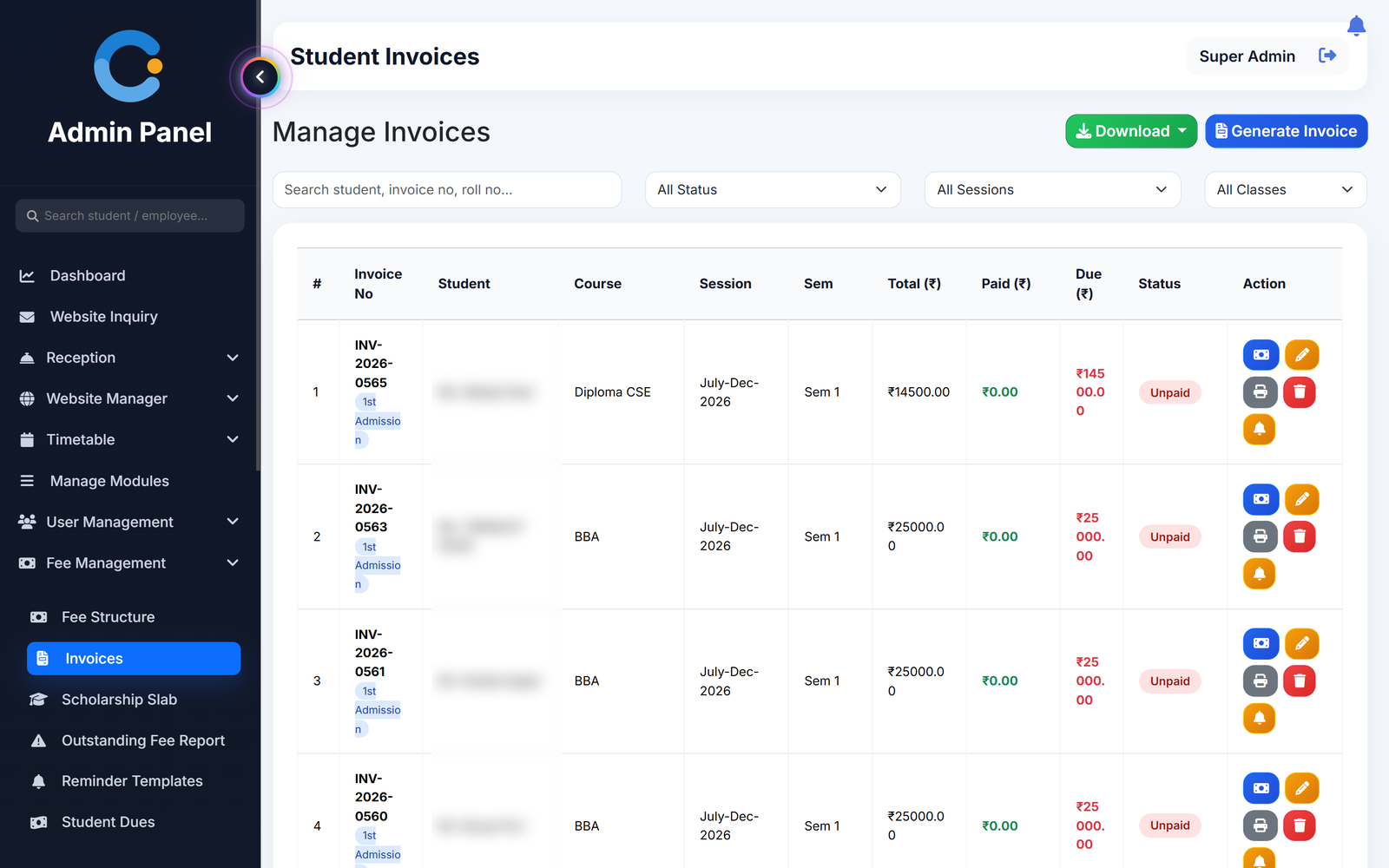
Set the fee structure once per course and semester. Invoices for the whole class are raised in one click, every payment prints its own receipt, and the outstanding list is always current — so nobody in the accounts office is adding up a register at month end.
Where fee collection usually breaks
Dues nobody can state exactly
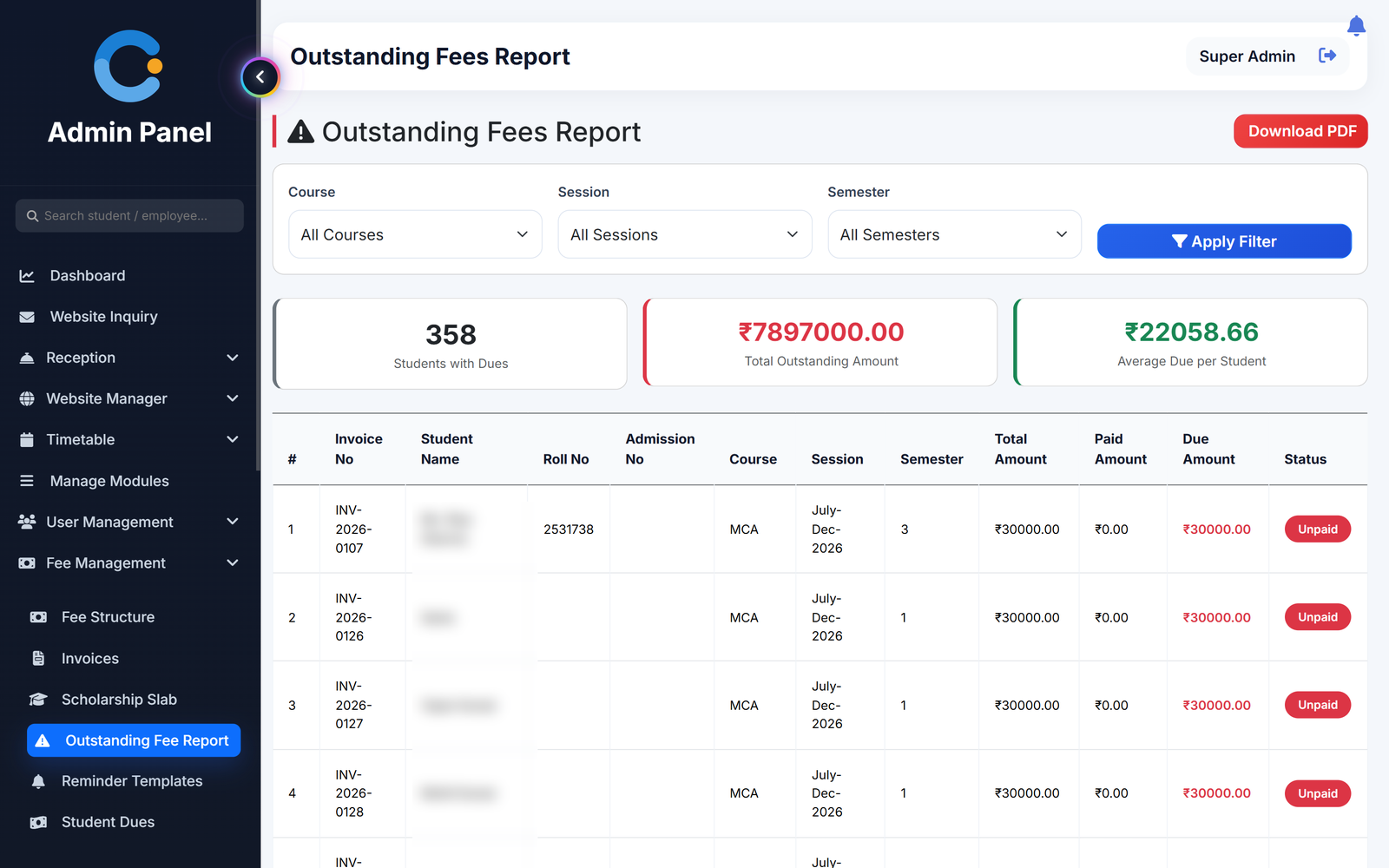
Ask what is outstanding today and the honest answer is a rough number. Here it is one report, by class, with the amount against every name.
Receipts written by hand
A receipt book means one copy and no total. Each payment entered prints a numbered receipt and reduces the balance on the invoice in the same step.
Scholarships worked out on paper
Define the scholarship slabs once. The concession is applied on the invoice itself, so the amount due is already the correct one.
Hostel and bus fees mixed with tuition
Hostel and transport are billed as their own monthly charges. A student can be clear on tuition and pending on hostel without the two being confused.
How a fee moves through the system
Four steps, each done once, each visible to the people who need it.
- Set the fee structure. Tuition, exam, admission, registration and caution amounts per course, session and semester.
- Raise invoices. Generate for one student or a whole class. Scholarship or discount can be applied or edited on the invoice.
- Record the payment. Cash, cheque or online transfer, full or part payment. The receipt prints and the balance updates.
- Follow up the dues. The outstanding report lists who owes what. Send a reminder by email from the same screen.
What is included
Who sees what
Accounts office
Raises invoices, records payments, prints receipts and runs the dues report.
Principal / management
Sees total collection and total pending on the dashboard without asking anyone.
Student
Sees invoices, payments and balance in the Android app or any browser.
Parent
Sees the pending amount for their child in the parent portal.
Asked about fee management
Can we collect fees in instalments?
Yes. An invoice accepts any number of part payments. Each one prints its own receipt and the invoice shows as partial until the balance reaches zero.
How are scholarships and concessions handled?
You define scholarship slabs once. A slab or a one-off discount is applied on the invoice, and it can be added or changed later on an invoice that already exists.
Are hostel and transport fees part of the same invoice?
No. Hostel and transport are raised as their own monthly charges from the date of allotment, with their own receipts and their own dues reports.
Which payment modes can we record?
Cash, cheque and online transfer. The payment is recorded by your accounts staff against the invoice; the system keeps the mode and reference with the receipt.
Can parents and students see what is pending?
Yes. Students see their invoices and balance in the Android app, and parents see the pending amount in the parent portal, so fewer of them need to ring the office to ask.
Modules that share the same records
Attendance
Period-wise attendance by the teacher, locked after saving, with class and student reports.
Exams & results
Exam schedules, marks entry by the subject teacher, grades, results and printable report cards.
Admissions & enquiries
Website enquiries, follow-up log, front-office reception and visitor records.
See fee management running with your institution's name on it.
- A real walkthrough, not a slide deck. We set your institution up while you watch.
- Bring your hardest question. Fees and exam patterns are where most systems fall over.
- No obligation. If it is not right for you, we will say so.
Book a free demo
Tell us about your institution and we will show you exactly how it would run.